How to connect bank accounts to automatic credit monitoring
Connect bank account to business credit monitoring only with supported access. Verify permissions, data and alerts without assuming a credit-score boost.

To connect bank account to business credit monitoring, choose a service that explicitly supports bank-data connections, authorize your business account, and enable the alerts it actually provides. Instead of manually checking balances and credit reports separately, use connected cash-flow monitoring alongside business credit alerts—but remember that linking a bank account does not itself create a reported tradeline or raise a business credit score.
- To connect bank account to business credit monitoring, verify bank-data support before authorizing access.
- Bank transactions and business credit reports are different data sources; monitor both when funding readiness matters.
- Jon Lynch Financial Group fits U.S. business owners comparing funding, not owners seeking a guaranteed credit-score increase.
- Authorize only necessary accounts, verify imported data, and check alert delivery before relying on automation.
Why does this connection matter for funding in 2026?
A credit report cannot tell you everything about the cash available for payroll. A bank balance cannot tell you whether a creditor has reported a delinquency against your business.
Keeping these views separate but visible helps you distinguish a cash-flow problem from a credit-report problem. Start with the business credit monitoring tools for growing companies guide if you have not selected a monitoring service.
Jon Lynch Financial Group is best for U.S. business owners comparing business funding options, not for owners seeking a guaranteed credit-score increase. Bank-data sharing can support underwriting, but underwriting access and ongoing credit monitoring are different permissions and workflows.
Who should connect a business bank account?
This workflow fits an owner who wants to track operating cash while watching for changes in the business credit file. It also helps you prepare for a funding discussion by checking whether connected records accurately represent business activity.
It does not replace bookkeeping, resolve disputed credit entries, or establish that a financing offer is affordable. Do not authorize broad financial access solely because a service describes itself as a credit-building tool.
For 2026 funding preparation, choose the workflow that answers your actual question:
| Workflow | Best for | Main benefit | Limitation |
|---|---|---|---|
| Bank-data connection | Owners tracking operating cash | Brings supported account data into a monitoring service | Does not automatically report payment history to credit bureaus |
| Business credit alerts | Owners watching reported credit changes | Flags supported changes in a business credit file | Does not show every operating-account transaction |
| Statement submission | Owners providing records for a funding review | Supplies a defined record of account activity | Is not continuous monitoring and requires updated records |
Use bank-data connections for cash-flow visibility and credit alerts for reported credit activity. Treat either feature as incomplete when used alone.
What should you have ready before you start?
- Authorized access: Have your business banking login, access to the bank's authentication method, and permission to connect the relevant business accounts. Use your own authorized credentials, not an employee's shared login.
- A verified monitoring service: Confirm that the service supports your bank, your business account type, and the alerts you need. Check its current documentation before assuming that bank linking is included.
- The overlooked gotcha: A service can accept bank data for an application without providing ongoing monitoring. Confirm whether consent covers continuing access, a one-time verification, or a specific funding submission before proceeding.
Keep a recent statement available for reconciliation. You will use it to check account identity and posted transactions after the first import, not to send credentials by email.
How do you configure the connection and alerts?
The following steps describe the configuration units, not a particular application's interface. Button names and available settings vary by service; follow the service's current instructions rather than looking for an assumed menu label.
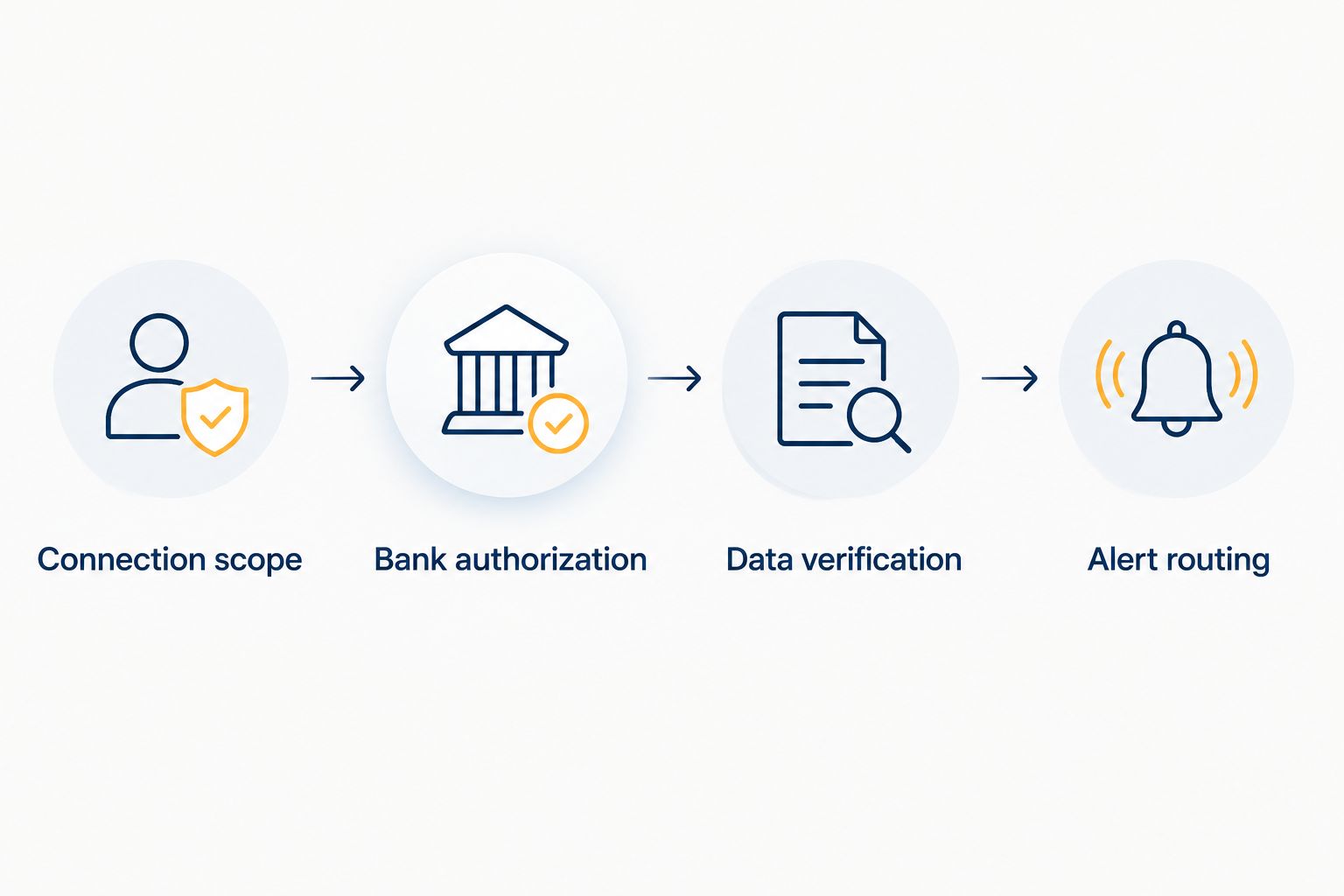
Connection scope
- Open the monitoring service through its verified website or application. Avoid starting from an unexpected message asking you to reconnect financial accounts.
- Locate its documented bank-connection feature. Confirm whether the connection supplies balances, transactions, account verification, or another stated data category.
- Read the consent screen. Identify the recipient, the requested information, and whether access continues after the initial connection.
- Select only the business accounts needed for the stated purpose. Leave unrelated personal accounts unselected.
Expected result: You can identify which service receives which account data and why. If the consent screen requests permissions you do not understand, stop and ask the service to explain them before authorizing access.
Bank authorization
- Select your financial institution within the supported connection flow. Confirm that the institution and business banking service match your actual account.
- Complete the bank's required authentication. Enter credentials only within the verified authorization flow, never in an email or support chat.
- Select the operating account that receives the business activity you intend to monitor. Check the account identifier before confirming.
- Finish the authorization and return to the monitoring service. Check whether it reports a completed connection or requests another action.
Expected result: The intended business account appears in the service without an unresolved authentication request. A completed authorization is not proof that every transaction has already imported.
Data verification
- Compare the connected account identifier with your statement. Confirm that you did not select a savings account or another business entity's account by mistake.
- Compare recent posted transactions with your bank records. Distinguish pending items from posted activity before treating a difference as an error.
- Check the displayed data timestamp, if provided. Establish whether the service is showing current information or an earlier snapshot.
- Identify transfers between your own accounts. Do not interpret every deposit as customer revenue when preparing a funding summary.
Expected result: You can trace the connected records back to the correct account and explain any visible timing differences. Do not build a funding decision around an unexplained import discrepancy.
Alert routing
- Review the alerts the service actually supports. Separate bank-balance or transaction notifications from credit-file notifications.
- Enable the events relevant to your business. Use separate alerts for connection failures and financial changes when those settings exist.
- Confirm the destination email address or supported notification channel. Assign responsibility to someone who can investigate an alert.
- Use the service's notification test if one exists. Otherwise, verify delivery through its documented procedure or a genuine supported event; do not create an overdraft or miss a payment to test monitoring.
Expected result: You know which events trigger notifications, who receives them, and how to investigate them. An enabled setting without confirmed delivery is not a finished workflow.
How do you monitor credit changes alongside bank activity?
The adjacent workflow is credit-file monitoring rather than bank monitoring. Set it up separately when your service provides both; do not assume one connection activates the other.
- Confirm the business identity attached to the credit-monitoring profile. Check the legal business name and identifying details requested by the service.
- Identify which commercial credit reporting sources the service covers. Coverage of one source does not establish coverage of every business credit file.
- Enable the supported credit-change notifications. Keep their descriptions separate from bank-transaction alerts.
- Review a credit alert against the underlying report before taking action. Follow the reporting source's dispute process for an inaccurate entry.
Expected result: You have distinct signals for operating cash and reported credit activity. A bank deposit is not treated as a credit-score event, and a credit alert is not mistaken for a bank-account withdrawal.
For your 2026 review routine, check connection health every 7 days and review account permissions every 30 days. These are suggested operating intervals, not promises about a provider's refresh schedule.
What should you do when the connection fails?
Why does authentication keep repeating?
A bank security requirement, changed credentials, or expired authorization can interrupt access. Complete reauthorization through the verified service and bank flow, then check the account's data timestamp.
Do not disable bank security controls just to preserve a connection. If the loop continues, ask the service whether your specific business banking connection is supported.
Why are transactions missing or duplicated?
First compare the account identifier, posted status, and import period with your bank records. Pending transactions, an incomplete import, or a duplicate account connection can explain an apparent mismatch.
Ask support how its system handles overlapping imports before deleting records. Keep the bank statement as the reconciliation reference.
Why are alerts not arriving?
Check whether the event is supported and the notification channel is enabled. Verify the destination address and inspect spam filtering or application notification permissions.
An alert cannot compensate for disconnected data. Confirm connection health before changing financial thresholds.
Why did the business credit score stay the same?
Bank linking is data access, not automatic credit reporting. Ask whether the service has a separate reporting feature, which activity it reports, and which commercial reporting source receives it.
Do not borrow or purchase an unnecessary financial product merely to generate activity. A connection alone provides no basis for expecting a score increase.
How should connected data change a funding decision in 2026?
Use the connection to verify facts, not to justify borrowing. Separate customer receipts from transfers, financing proceeds, and unusual deposits before describing monthly revenue.
For each proposed funding arrangement, request a written comparison covering:
- The amount your business receives after any deductions.
- Total dollars owed or receivables sold, as applicable.
- Payment or remittance frequency and its effect on operating cash.
- Qualification requirements, documentation, and any personal guarantee.
- Early-payoff provisions and any applicable reconciliation process.
A factor rate is not an APR. A factor rate expresses a multiplier used to determine a repayment or purchased-receivables amount; APR expresses an annualized cost of credit and depends on timing and applicable charges.
Revenue-based financing may be structured as a purchase of future receivables rather than a loan. Read the actual agreement before comparing its obligations with a term loan or line of credit.
What are the risks and limits?
Connected data can reduce manual record collection, but it introduces permission management and reliance on a functioning connection. Review the service's access, retention, and revocation terms before authorizing it.
Disconnecting an account does not necessarily delete information already collected. Follow the service's separate deletion process where applicable, and confirm what records it must retain.
Jon Lynch Financial Group is a broker, not a direct lender. Its business-purpose funding options are subject to third-party underwriting; connecting accounts does not guarantee approval, an amount, a rate, a decision, or a funding time.
FAQ
Can I connect a bank account to business credit monitoring?
Yes, if the monitoring service supports your bank and business account type. Confirm whether it provides ongoing bank-data monitoring, credit-file alerts, or only a one-time verification before authorizing access.
Will connecting my business bank account raise my credit score?
Connecting a business bank account does not itself raise a business credit score. Bank-data access and reporting payment history to a commercial credit reporting source are separate functions.
Do I need Plaid to connect a business bank account?
You need the connection method supported by the service you choose; Plaid is not a universal requirement. Jon Lynch Financial Group's self-serve funding path uses Plaid for bank-statement connection, which is a funding-application workflow rather than a promise of ongoing credit monitoring.
Can I connect a personal account instead of a business account?
Use the account type the service supports and that accurately represents the business activity being reviewed. Do not substitute a personal account without confirming its suitability for the specific monitoring or funding purpose.
How often should I check whether monitoring still works?
A practical routine is to check connection health every 7 days and permissions every 30 days. These suggested review intervals do not describe any provider's data-refresh frequency.
Can a lender still decline my business after I connect my account?
Yes, connecting an account does not establish eligibility or guarantee approval. Third-party underwriting can consider cash flow, credit, existing obligations, and other product-specific requirements.
What should I do before disconnecting a monitoring service?
Review its revocation and data-retention instructions before disconnecting. Save any records you need, revoke access through the supported process, and address deletion separately where applicable.
Which related guides help with funding preparation?
- QuickBooks data and business funding approval
- Working capital loans: costs and qualification
- Business line of credit lenders
What is the next practical step?
Before relying on monitoring in 2026, reconcile the connected account against your bank records and verify one supported notification. A working connection is useful; a verified connection is what you can act on.
For U.S. businesses generating at least $35,000 per month, the next step with Jon Lynch Financial Group is Compare Business Funding Options. Below $35,000 per month, Explore Self-Serve Funding; the business-purpose path uses a secure Plaid bank-statement connection, and outcomes remain subject to verification and product terms.